
Discord Alerts & TradingView Indicator

Wyckoff Schematics,
revealed.

Automatically detect Wyckoff Schematics across all timeframes. The most advanced Wyckoff indicator on TradingView.
7-day free trial  ยท  Cancel anytime
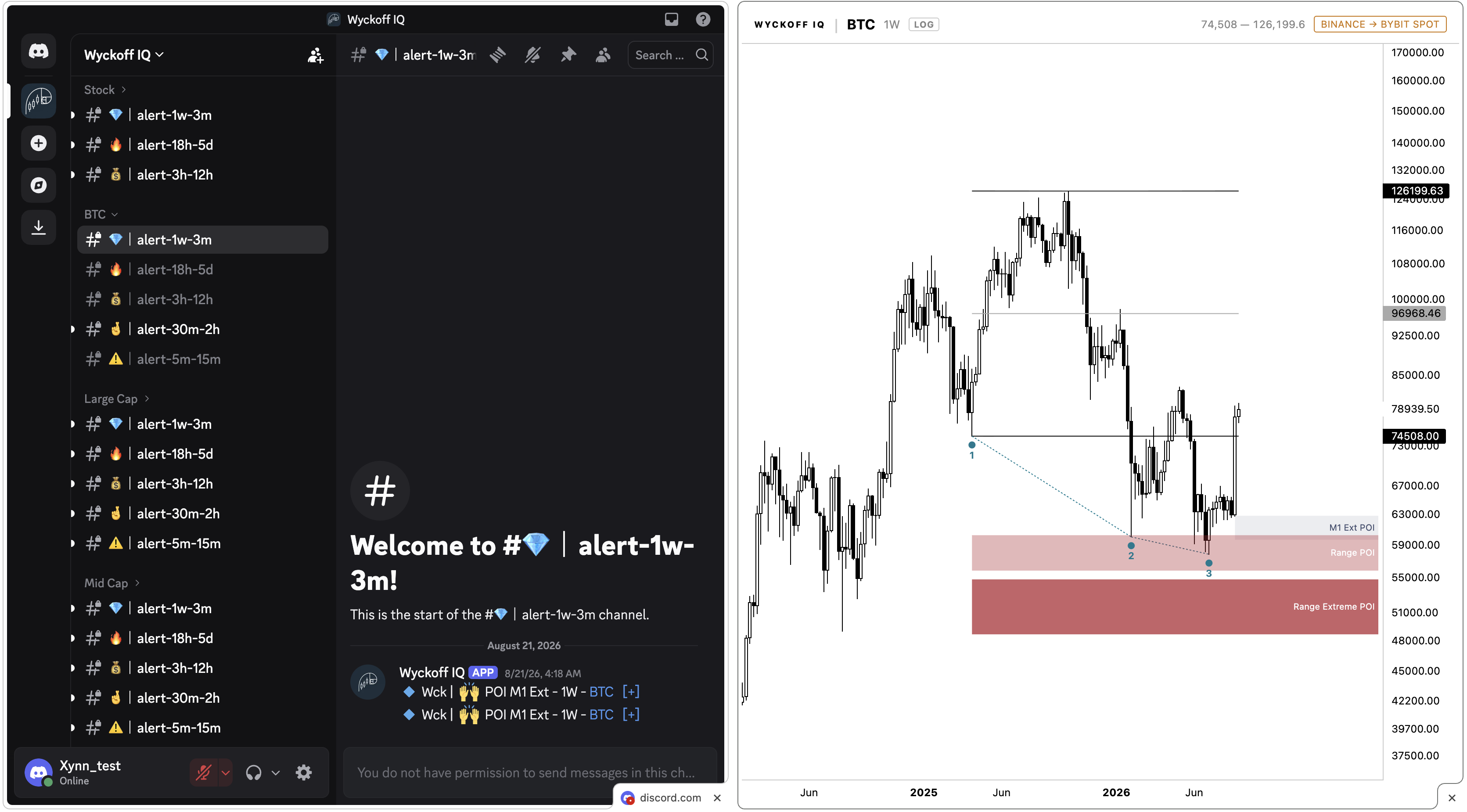
BTC ยท 1W ยท Wyckoff IQ
Wyckoff IQ chart showing a BTC weekly range with Tap 1, Tap 2, and Tap 3 markers and Range POI / Range Extreme POI zones
Model 1 & 2 detection
1,000 coins scanned
5 min to 1 Month timeframes
Real-time Discord delivery
Features

Detect Wyckoff Schematics Instantly

Accumulation, distribution, and every phase in between.

Wyckoff Schematics Model 1 & 2

The detection algorithm is tuned to catch both Model 1 and 2 schematics, labeled directly on the chart as they form.

Scans 1,000 Coins

Crypto scanned continuously so you catch schematics forming across the market. Prefer to focus? Choose exactly which coins you get alerted on in Discord.

Live Discord Alerts

Every schematic event is sent straight to Discord the instant it triggers, automated and real-time, so there's no polling your charts.

All Timeframes

Every timeframe from 5-minute scalps to monthly swings is covered, with detection tuned to the range you're trading.

Tap 1, 2, 3 & Tap 3 Extended

Spring, retest, and LPS events are simplified into a clear Tap sequence, so you always know exactly where price is in the range.

Built to Save You Time

No manual scanning, no missed setups, since the alerts come to you in Discord, so screen time goes toward decisions, not searching.

Alerts, delivered

Your alerts, in seconds.

Once you're subscribed, Wyckoff schematic alerts land in the Wyckoff IQ Discord automatically, with the coin, tap, and timeframe context included.
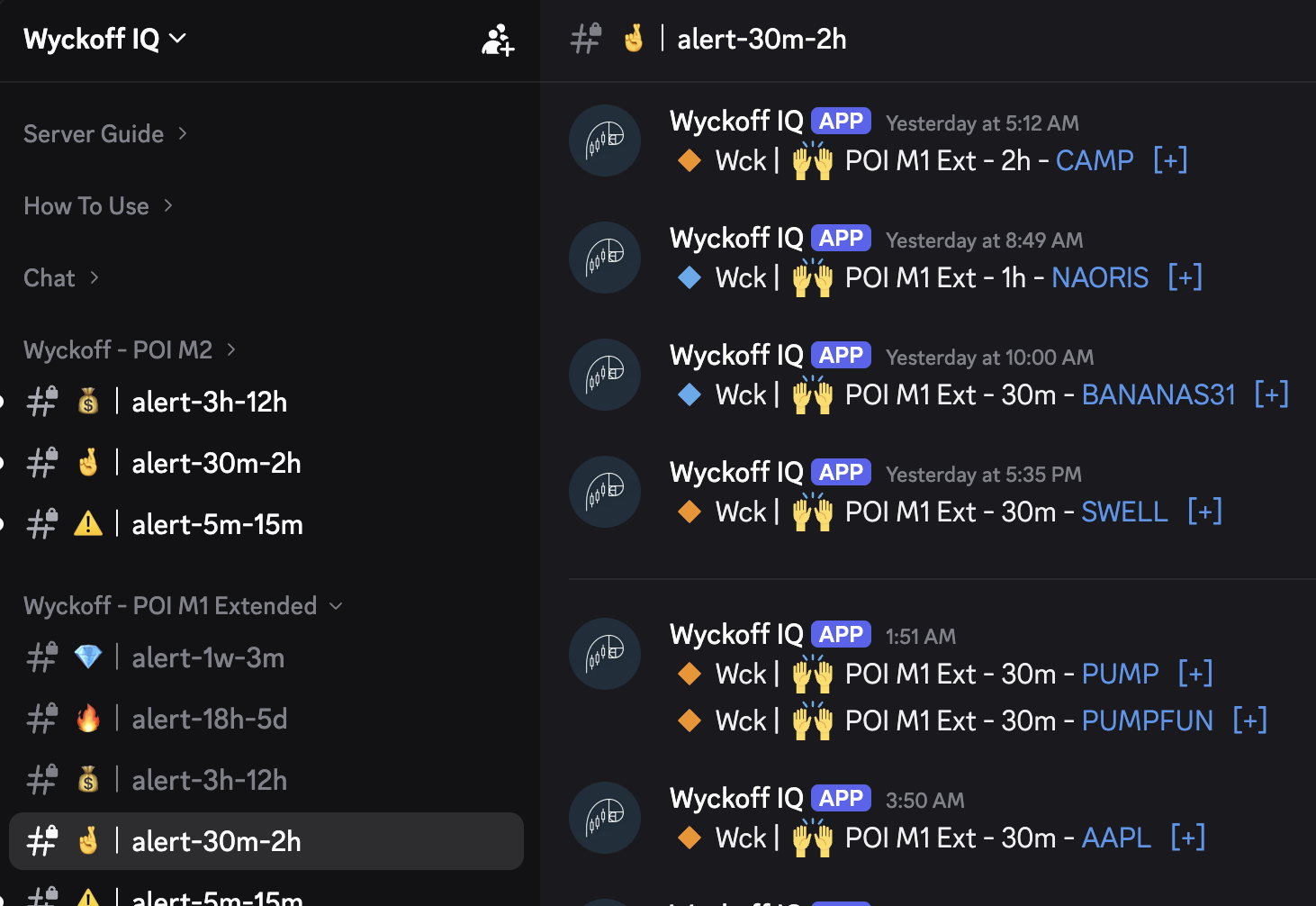
Alerts arrive the moment a schematic is confirmed
Discord access is granted right after checkout via Whop โ€” just activate it and connect your Discord account within Whop to get in
The Wyckoff Schematic is drawn automatically within Discord
Pick exactly which alerts you get, by coin (BTC), market-cap tier, or prop-firm instruments, or subscribe to all of them
Wyckoff IQ Discord server channel list showing alert channels organized by coin and timeframe
Pricing

Simple pricing, no surprises

Try any plan free, cancel anytime.

๐Ÿš€ Launch Sale โ€” 20% off monthly
33% off yearly
7-day free trial on every plan
Monthly
Yearly

Indicator *

TradingView indicator only, no alerts.

7-day free trial
๐Ÿš€ Save 20% at launch
$12.49$9.99/ month
Wyckoff TradingView indicator
Works on any timeframe
Get Access Now

Discord Alerts

Live alerts in the Wyckoff IQ Discord.

7-day free trial
๐Ÿš€ Save 20% at launch
$19.99$15.99/ month
Live Wyckoff schematic alerts in Discord
Scans 1,000 coins across crypto
All timeframes from 5 min to 1 Month
Get Access Now

* The Wyckoff IQ indicator does not include alerts. Alerts are only delivered through the Wyckoff IQ Discord, regardless of plan.

* Indicator access is granted manually within 24 hours of payment.

See it in action

Four minutes, start to finish

A quick walkthrough of Wyckoff IQ live on a chart, from schematic detection to the Discord alert landing.

Real charts

Setups, as the indicator drew them

Unedited chart previews generated by Wyckoff IQ, showing Tap 1 / Tap 2 / Tap 3 and the POI zones the alert fired from.

RENDER ยท 4h
RENDER ยท 4h โ€” reversal off the Range Extreme POI after Tap 3.
UBER ยท 4h
UBER ยท 4h โ€” bearish rejection at the Range Extreme POI.
AEVO ยท 30m
AEVO ยท 30m โ€” same schematic logic, scaled down to intraday.
BRETT ยท 1h
BRETT ยท 1h โ€” reversal off the Range POI zone.
SCR ยท 30m
SCR ยท 30m โ€” Tap 3 sweeps the zone before reversing.
FIL ยท 1D (log)
FIL ยท 1D โ€” the same structure holding up on a higher timeframe.

Charts shown are historical examples generated by the Wyckoff IQ indicator and are for illustrative purposes only. A drawn schematic is not a trading signal or a guarantee of future performance โ€” see our disclaimer.

Reviews

Trusted by traders on Discord

โ˜…โ˜…โ˜…โ˜…โ˜…

"Placeholder testimonial, swap in a real quote once you have reviews."

Trader Name
@handle
โ˜…โ˜…โ˜…โ˜…โ˜…

"Placeholder testimonial, swap in a real quote once you have reviews."

Trader Name
@handle
โ˜…โ˜…โ˜…โ˜…โ˜…

"Placeholder testimonial, swap in a real quote once you have reviews."

Trader Name
@handle
Please read

Disclaimer

A few things worth knowing before you rely on any alert.

โš ๏ธ Not Financial Advice

Alerts are generated automatically based on predefined technical criteria. They're provided for informational and educational purposes only and do not constitute personalized investment advice or a recommendation to buy or sell any financial instrument. No future performance is guaranteed, since past setups are not indicative of future results. Financial markets carry a risk of capital loss, and you are solely responsible for your own investment decisions.

๐Ÿ“Š Markets Covered

Alerts span crypto, but only for coins the indicator has been added to on TradingView. It's a predefined watchlist, not a live scan of the entire market, so a valid setup can exist on a coin we simply don't cover.

๐Ÿ” Setups Are Not Signals

The setups shared here are not tradable by themselves and are not signals. They only automate the discovery of potential setups by scanning the market, so it's your sole responsibility to check and validate any setup before acting on it.

๐Ÿ“‰ Data Can Be Wrong

Not all setups are accurate, due to possible data issues. Always check the original chart on TradingView for accuracy before making any decision.

๐Ÿ”— Chart Previews

Discord alerts include a clickable chart preview for most coins. For a minority of coins, that preview and link may be missing, which is a Discord-side limitation only. The TradingView indicator itself still detects and displays the schematic correctly on those coins; only the Discord preview is affected.

โฑ๏ธ Setups Can Conflict Across Timeframes

A valid setup on one timeframe can point the opposite direction on another (e.g. bullish on the 4h while the 1D is bearish). Alerts don't factor in cross-timeframe confluence. And since these are potential setups, not signals, working out which one to trust doesn't make it correct, since both could simply be wrong. Treat every setup as a structure worth investigating, not an answer.

FAQ

Questions, answered

No. Wyckoff IQ runs as an invite-only indicator and works on any TradingView plan, including the free tier.
After checkout, go to Whop, claim your access, and link your Discord username through Whop's integrated Discord connection. Once linked, you're granted access to the Wyckoff IQ Discord automatically, and schematic alerts start landing there.
Yes. Inside the Discord's #alerts channel, you pick exactly what you want to follow, by coin (like BTC), by market-cap tier (Large, Mid, Small, Micro), by prop-firm instruments, or subscribe to everything at once. You can change your selection anytime.
No, the indicator only draws Wyckoff schematics on your TradingView chart, it doesn't push alerts on its own. Regardless of which plan you choose, alerts are only ever delivered through the Wyckoff IQ Discord.
Yes. Subscriptions are month-to-month (or annual, if you choose yearly billing) with no lock-in. Cancel anytime from your billing portal and keep access until the end of your current period.
EU/French customers have a 14-day right of withdrawal starting from their first payment, as required by law; see our Terms of Service for the full process. Outside that window, you can cancel anytime and you'll keep full access until the end of your current billing period; we don't offer refunds for time already used beyond the withdrawal period.
Yes, every plan starts with a 7-day free trial, so you can see the Service on your own charts before your subscription begins.
No. Wyckoff IQ detects and labels potential (no guarantee) Wyckoff schematics, it doesn't tell you what to buy or sell. Nothing here is financial advice; all trading decisions are your own.
Crypto is scanned continuously, 1,000 coins in total. Detection adapts to the coin and timeframe you apply it to.
Discord: after checkout, go to Whop, claim your access, and link your Discord username through Whop's integrated Discord connection โ€” access is granted automatically as soon as you do. TradingView: access is added manually on our end, typically within 24 hours, using the TradingView username you provide at checkout; delays caused by an incorrect username are not on us.

Ready to see your Wyckoff schematics clearly?

Start your 7-day free trial and get your first alert in Discord within minutes.